



























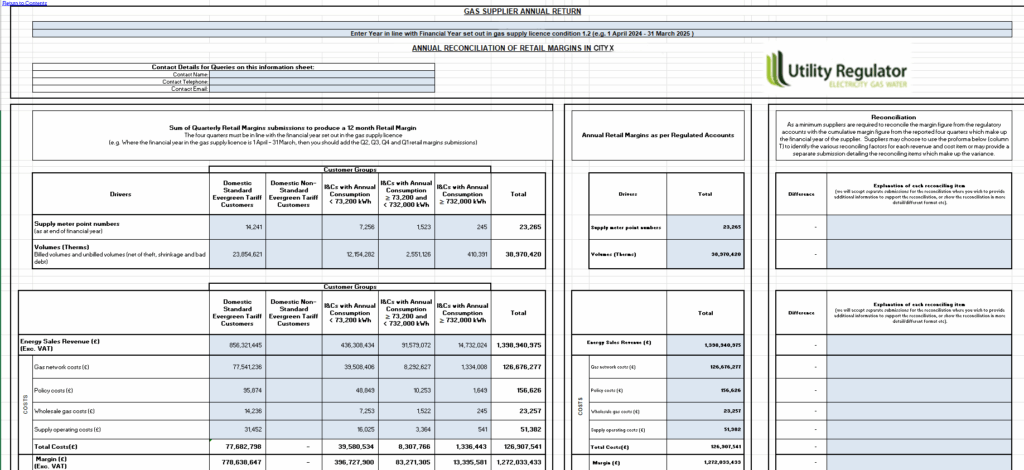
Utility regulatory compliance and business intelligence are two critical capabilities that determine whether your system can support long-term business growth. In late December, we had a webinar on 2026 and beyond regulations and what utilities should expect from regulators. We clearly see that bill transparency and breakdown, audit trails and different kinds of reporting become pivotal for organisations. Small utility companies should consider these capabilities once they think about growth and expansion.
The truth is, Excel cannot provide either. However, when transitioning from Excel to automated billing, you can build these capabilities into your foundation.
Following the article explaining all the aspects of the transition from manual billing to automated billing, in this piece, we’d like to explore how to implement compliance and reporting capabilities into your ops.
Let’s get closer to it.
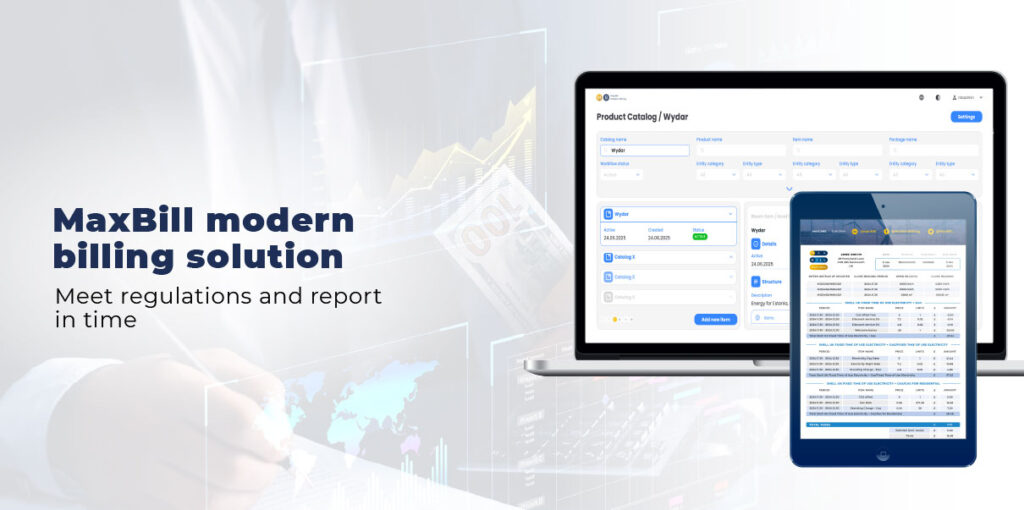
Why Excel cannot ensure regulatory compliance
At MaxBill, when helping small growing companies to transition from Excel or similar tools, we see the following reasons:
Excel relies on manual file management
Files get lost, overwritten, or corrupted. There’s no systematic retention policy. When regulators require seven years of billing history, you might discover files are missing or unverifiable. Even if files exist, they might be scattered across personal drives, shared folders, and email attachments.
Inconsistent documentation
Invoice formats change based on who creates them. There’s no enforced template consistency. Detailed breakdowns exist in some files, not in others. This inconsistency becomes a compliance liability when regulators expect standardised, transparent customer communications.
No billing history
Excel doesn’t provide customers with systematic access to their billing history. Manual responses to customer requests create delays and inconsistency. There are both problematic under consumer protection regulations that require timely, accurate information access.
No audit trails for billing decisions
EU requirements are intensified from 2026. Regulators increasingly expect complete audit trails for all billing decisions. Utility suppliers need to be able to reproduce any historical invoice exactly, transparent and detailed customer communications, systematic data retention spanning years, and defensible calculation methodologies.
Excel cannot meet these requirements. It creates files, not compliant records. The gap between what Excel provides and what regulators require is widening every year.
How MaxBill billing delivers built-in regulatory compliance

Automatic change tracking & audit logging built in
MaxBill billing solution automatically records every tariff update, contract change, pricing adjustment, and system modification with full audit trails. User roles and permissions ensure every action is attributed to a specific person. AI tracks all versions of tariff rules and pricing structures.
Result: You always have a complete, regulator-ready record of who changed what and when without manual documentation.
Calculation transparency embedded in every billing cycle
Every invoice includes a detailed calculation breakdown, showing consumption, rates, logic applied, and adjustments. The system stores the exact billing logic used for that cycle, and historical invoices can be reproduced exactly as originally issued.
Result: You can prove how any invoice was calculated even years later, supporting audits, complaints, and regulatory checks effortlessly.
Automated data retention & archival
MaxBill billing solution manages retention policies automatically. It keeps customer history, billing events, calculation logic, and invoice archives accessible for as long as regulations require. Long-term backups, closed-period archiving, and structured storage are handled by the platform.
Result: Full data retention compliance without manual effort or separate record-keeping processes.
Billing regularity & controls system-enforced
MaxBill approach enforces consistent billing schedules with automated cycles that run on time, every time. Validation steps prevent incomplete runs, and alerts notify teams if anything risks missing regulatory deadlines.
Result: consistent, predictable billing practices aligned with regulatory expectations.
Your takeaway should be: compliance becomes operational, not optional. With MaxBill billing:
- Regulatory documentation is always ready
- Audits are quick and fully traceable
- Customer disputes are resolved fast with a complete history
- System-wide updates deploy instantly
- Compliance is embedded into every step of the billing lifecycle
You don’t prepare for regulatory scrutiny; your billing system already is.
Why Excel fails with reporting and analytics if solely used
Reporting requires manual assembly
Every report forces you to open multiple files, copy data, and hope formulas still work. Even answering basic questions like “What was our revenue last quarter?” can take hours or days.
Data aggregation is slow and outdated
Someone must manually combine monthly billing files, reconcile discrepancies, and rebuild summaries. By the time results are ready, they’re already obsolete.
No real-time visibility
Excel only shows what was last updated. You can’t see today’s receivables, billing status, or KPIs without exporting new data and refreshing everything manually.
Fragmented data across multiple files
Customer data lives in one sheet, consumption in another, payments elsewhere. Profitability analysis requires manual combination — and it’s outdated as soon as it’s finished.
Forecasting is nearly impossible
Creating accurate revenue or cash flow forecasts in Excel demands heavy manual modelling, so most small operators simply don’t do it — leaving financial planning as guesswork.
Performance collapses as you grow
As customer volume increases, spreadsheets become slow, unstable, and prone to crashes. Tools that worked for 200 customers break at 2,000.
The business operates in the dark
Strategic questions go unanswered because extracting insights takes too long. Competitors using real business intelligence move faster while you rely on intuition.
Business intelligence capacities ensured by MaxBill
Often, small operators need answers instantly: What’s our revenue next quarter? Which customers are profitable? Where are we losing money? How do KPIs trend? Excel can’t do this.
The MaxBill’s approach suggests that business intelligence is built directly into the billing engine. Here are the top 3 processes to ensure you see what’s really happening in your billing:
- Automated reporting: your core insights, always up to date
MaxBill solution comes with prebuilt, auto-updating reports for all essential metrics:
- Revenue summaries
- Aging receivables
- Consumption trends
- KPI dashboards (customizable)
- Regulatory reporting (customizable)
Reports refresh automatically on fixed schedules (daily/weekly/monthly), and teams access them in real time without any manual requests or spreadsheet assembly.
Result: you get continuous visibility into performance, and reporting runs itself, not your team.
2. Embedded billing accuracy controls: intelligence before errors happen
MaxBill billing includes AI-driven validation and anomaly detection that runs before every invoice:
- Automated rules catch incorrect data
- AI flags unusual consumption or billing patterns
- Exceptions are routed into approval workflows
- Pre-billing reports highlight items needing review
Result: Problems are detected before customers ever see an invoice, and accuracy becomes a system feature, not manual work.
3. KPI monitoring: intelligence that alerts you, not the other way around
From day one, MaxBill methodology suggests tracking the KPIs that matter:
- Payment timing
- Collection efficiency
- Customer support volume linked to billing
Dashboards update automatically, and alerts notify the team if KPIs fall outside expected ranges.
Result: you can early identify operational issues and manage proactively instead of reactive firefighting.
What this means for growing utility businesses
We identify the top 6 business outcomes that growing utilities receive:
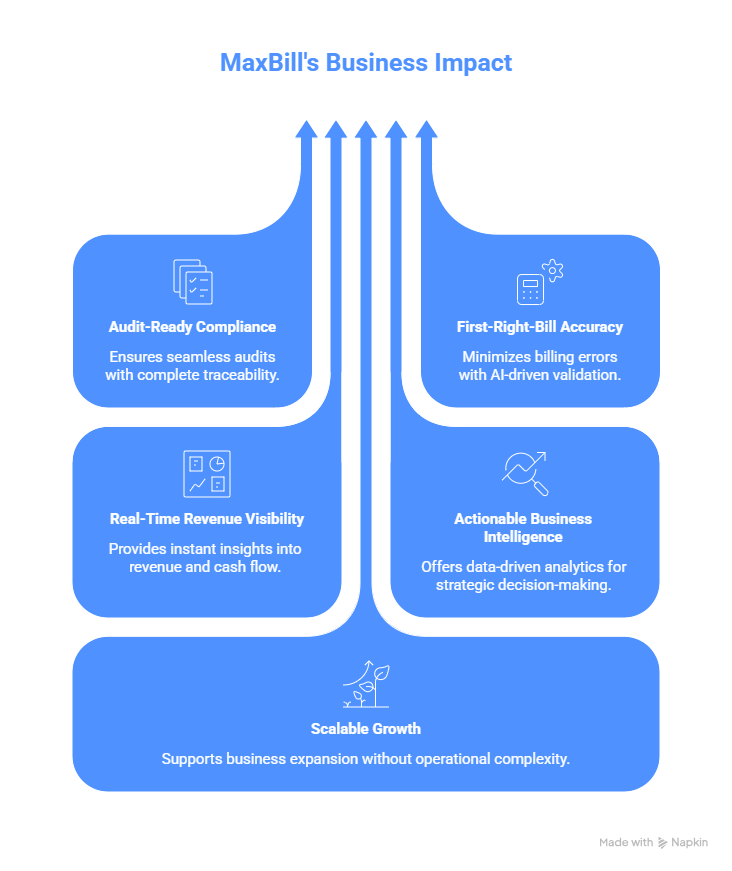
Simply put: you stop managing spreadsheets and start managing the business, removing regulatory pressure.
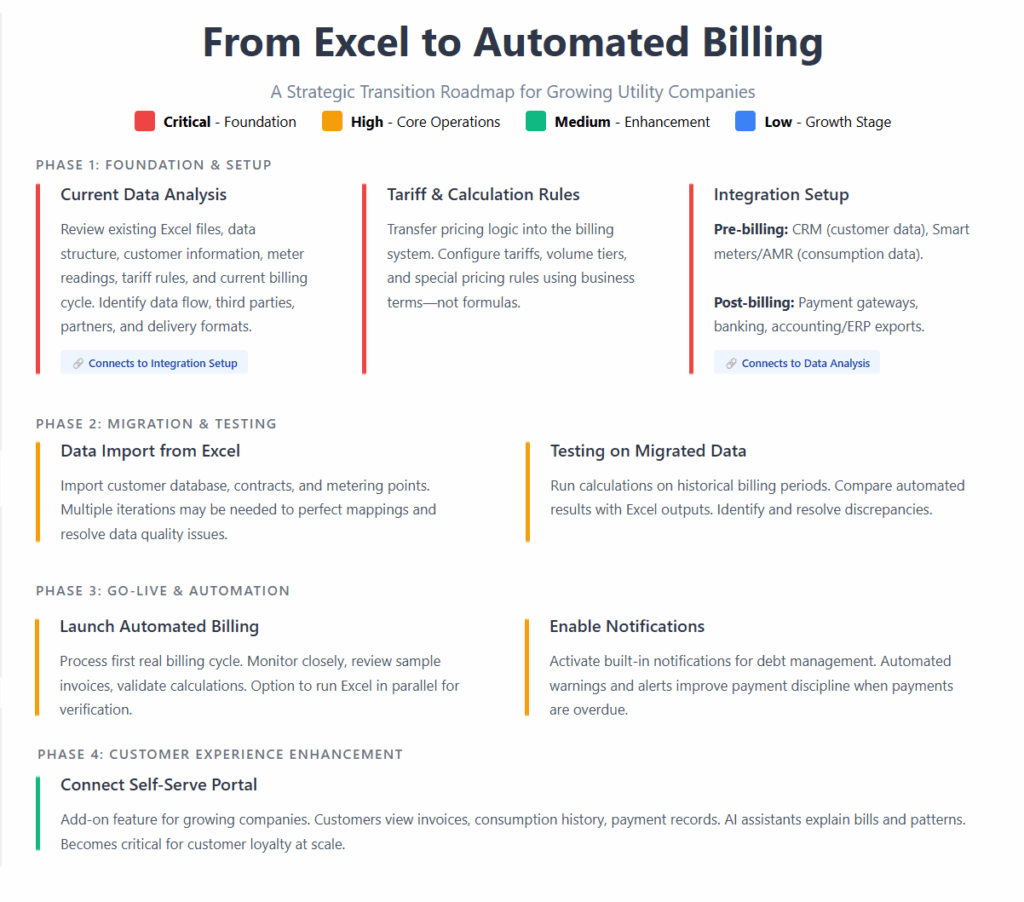
Your next step: how to transition from Excel to automated billing
Below is a short but comprehensive scheme of how the transition is being performed:
Conclusion: being ready for today and tomorrow
Regulatory readiness and business intelligence are no longer optional capabilities for modern utilities. With the MaxBill billing solution, both come built into the platform from day one, so even small operators transitioning from Excel can operate with the same confidence and rigour as larger providers.
The shift away from spreadsheets isn’t just a technical upgrade; it’s the moment to adopt a billing system that automates compliance, ensures accuracy, and drives smarter decision-making.
MaxBill billing with AI-driven capabilities delivers these capabilities natively: audit trails, calculation transparency, event-based billing, automated reporting, anomaly detection, and real-time KPIs.
You don’t need to deploy every feature at once. MaxBill gives you a scalable foundation: start with accurate automated billing, then expand into regulatory reporting, analytics, and AI-driven intelligence as your business grows.
Utilities that adopt this approach gain a long-term advantage, operating confidently, complying effortlessly, and making decisions based on real intelligence rather than intuition.
Those that only digitise basic billing relieve today’s pain but remain exposed to tomorrow’s requirements.
Do you need an automated billing solution with built-in compliance and reporting workflows? Contact our team.